 Barely
Disk space
Get your Mac's disk space back from old Docker images
Delete images, volumes or the build cache, and Barely returns the space to macOS.
A Docker VM's disk usually only grows. Deleting images frees space inside it for more images, not on your Mac. With Barely, the space a deleted image used goes back to macOS once it's freed.
The trial needs no account, email or credit card.
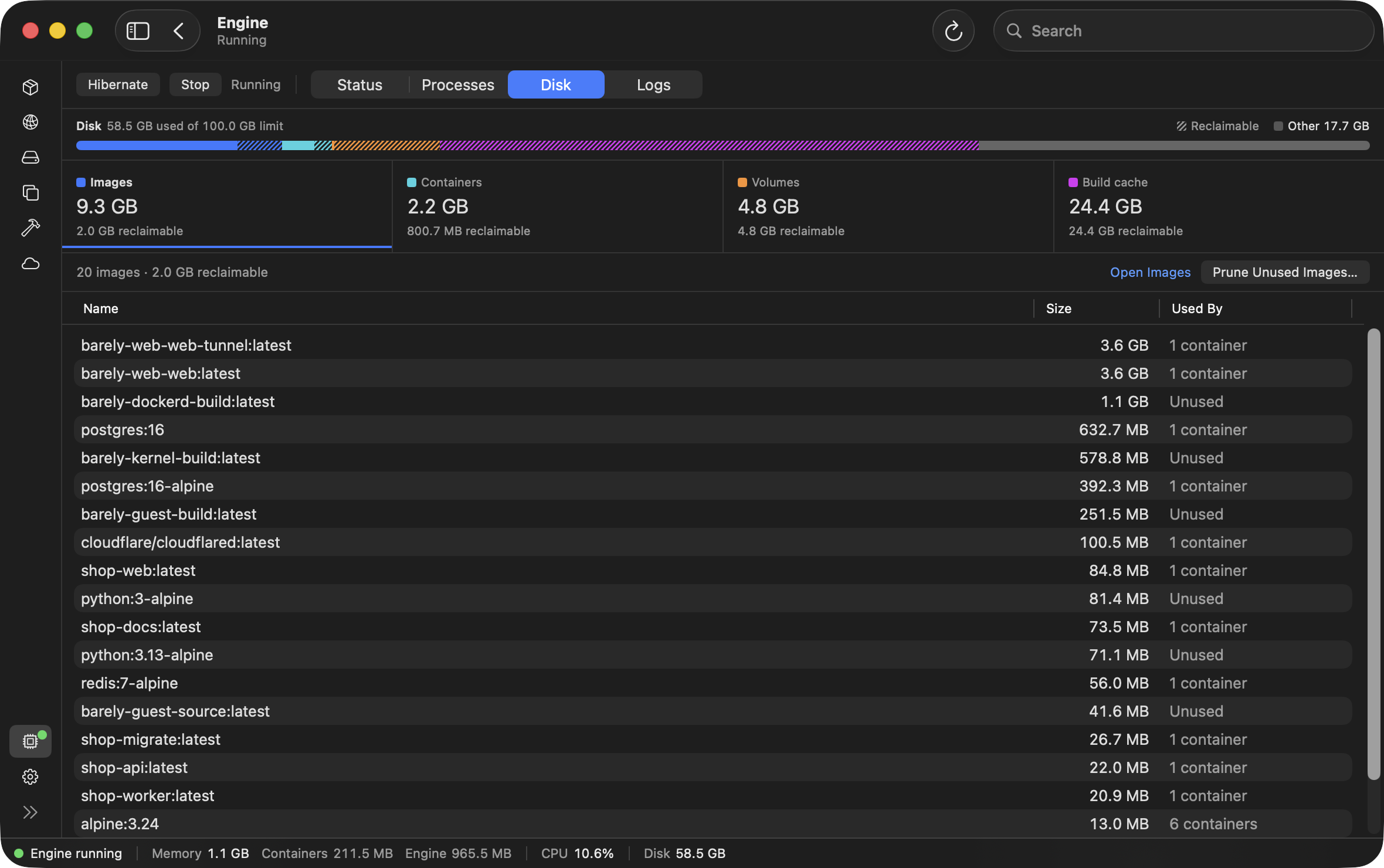
The VM's storage disk shrinks when you delete things
The VM's storage disk holds your images, containers, volumes and build cache, and uses only as much of your Mac's disk space as they need. Deleting any of them gives the disk space back to macOS.
- The storage disk can grow to 100 GB by default, but on your Mac it uses only the space its contents need.
- Deleting an image, container or volume frees its space on your Mac.
- Clearing the build cache frees its space on your Mac.
In the app, Engine › Disk shows what images, containers, volumes and the build cache each take, and how much of each you can free. Prune any of them from there, and the space goes back to your Mac.
To let the storage disk grow past 100 GB, raise the disk limit in the app under Settings › Resources. The limit can be raised later, not lowered. It's only a limit: a storage disk holding 50 GB takes 50 GB on your Mac, whatever its limit. Keep the 100 GB default and raise it when you need more.
Questions
How do I get disk space back from Docker on a Mac?
On Barely, delete what you don't need, in the app or with docker. Deleting an image, container or volume frees its space on your Mac, and so does clearing the build cache.
How do I see how much disk Barely is using?
In the app, open Engine and choose Disk. It shows what each part of the disk holds, and how much of it you can free. In the terminal, barely status shows the total.
Can I lower the disk limit?
No. The limit can be raised later, not lowered. It's only a limit: the storage disk takes only the space it holds on your Mac.
Try it on your own containers
The trial is 30 days and needs no account, email or credit card. Purchase at any time, $99 once.